

The fastest way to get accurate results from ChatGPT is to stop asking questions the way you’d ask a search engine and start giving instructions the way you’d brief a new employee. ChatGPT doesn’t “know” what you want it predicts the most likely response based on the words you give it, so vague input almost always produces vague, generic, or slightly-off output. Better prompts aren’t about typing longer messages; they’re about giving the model context, constraints, and a clear goal.
This matters more now than ever. As AI tools become part of daily workflows across the Tech Trends community from content creation to coding to research the gap between people who get useful answers and people who get frustrated is almost entirely a prompting skill gap. The good news is that this skill is learnable in an afternoon.
Below is a practical, no-fluff breakdown of what actually makes a ChatGPT prompt effective, with real examples you can copy and adapt.
What Makes a ChatGPT Prompt “Accurate” vs. Vague
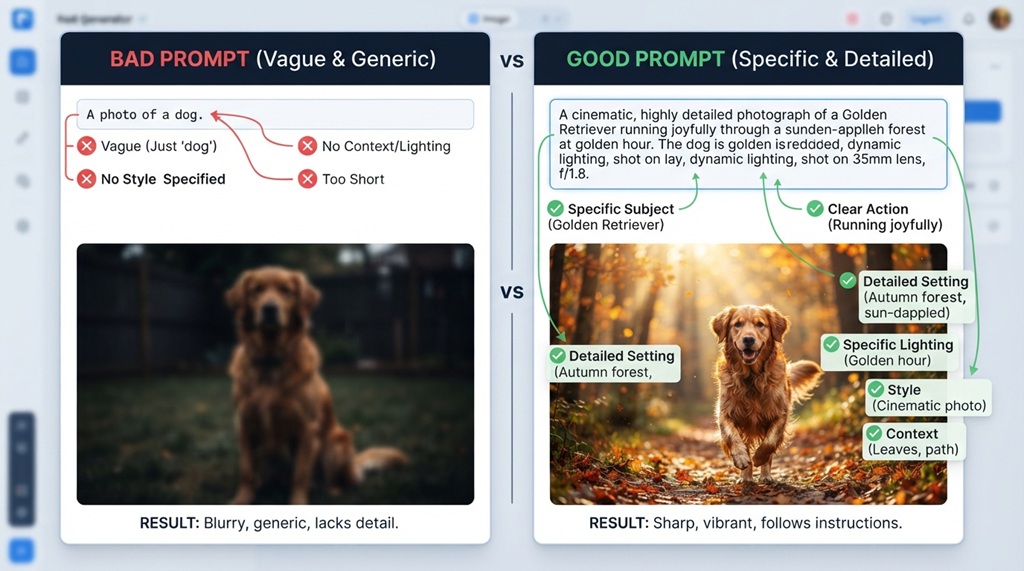
An accurate prompt gives the model enough context, a specific task, and a defined output format so there’s little room for it to guess wrong. A vague prompt leaves all three of those open, which forces ChatGPT to fill in the gaps with generic assumptions.
For example, “Write about marketing trends” is vague the model doesn’t know your industry, audience, tone, or purpose, so it defaults to the most statistically average response it can generate. Compare that to: “You’re a marketing strategist writing for small e-commerce founders. List 5 marketing trends for 2026 that require a budget under $500/month, with one actionable tip per trend.” That second version removes almost all guesswork.
The difference isn’t length for its own sake it’s specificity. A short, specific prompt will consistently outperform a long, rambling one.
The Core Framework: Role, Context, Task, Format
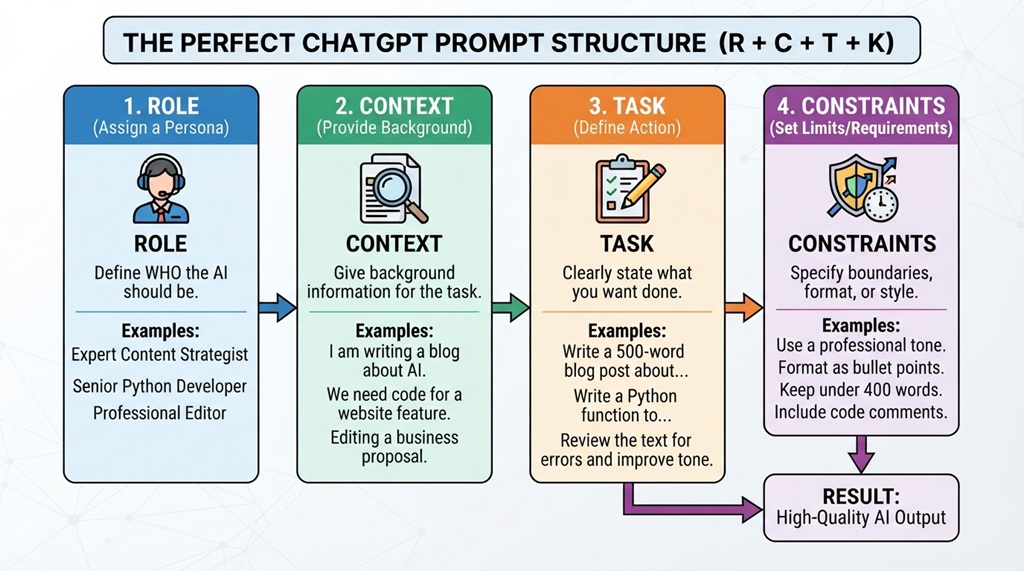
A reliable way to structure any prompt is to cover four elements: who the AI should act as, what background information it needs, exactly what you want done, and how you want the answer delivered.
Elevate Precision by Defining a Strategic Role
Assigning a specialized role immediately sharpens the model’s focus and establishes an authoritative perspective—transforming a generic request like “Explain SEO” into a tailored masterclass such as “Act as an SEO consultant explaining backlinks to a non-technical small business owner,” which seamlessly recalibrates depth, vocabulary, and nuance. Crucially, explicitly defining your personal tone and brand guidelines within this framework ensures the generated output yields accurate, highly aligned results without sacrificing authenticity. For a deeper dive into scaling your output while seamlessly preserving your distinctive brand identity, use AI for content creation without losing your voice.
Context: Give It the Background
Context is the information a human collaborator would need before starting the task your audience, goal, constraints, or prior attempts. Skipping this is the single biggest reason people get generic answers, because the model has no way to know your situation unless you state it.
Task: State the Exact Action
Be explicit about the verb: “summarize,” “compare,” “rewrite,” “critique,” “list,” or “generate” all produce different structures. A prompt like “Talk about my resume” is ambiguous, while “Critique my resume for weaknesses a hiring manager would notice in the first 10 seconds” gives ChatGPT a clear job.
Format: Define the Output Shape
Specify whether you want a table, bullet list, word count, tone, or structure. If you don’t define this, ChatGPT will guess and its guess often doesn’t match what you actually needed for your document, slide, or email.
Common Prompting Mistakes That Lead to Inaccurate Answers
Most inaccurate ChatGPT responses trace back to a handful of repeatable mistakes rather than the model simply being “wrong.” Fixing these usually improves output quality more than any advanced technique.
Asking Multiple Questions at Once
Stacking three or four unrelated questions into one prompt often causes the model to answer only part of them or blend them together. Splitting a complex request into sequential prompts one question, then a follow-up usually produces sharper, more complete answers.
Assuming ChatGPT Remembers Unstated Preferences
Even within a single conversation, ChatGPT only “remembers” what you’ve explicitly said earlier in that chat (or, in some cases, what’s stored in memory settings). If you haven’t told it your tone preference, audience, or constraints in this conversation, restate them rather than assuming it recalls a similar chat from last week.
Not Specifying What to Avoid
Telling the model what you don’t want is just as useful as telling it what you do want. A prompt like “Write a product description, but avoid clichés like ‘game-changing’ or ‘revolutionary’” filters out the generic phrasing AI tools are known for overusing.
Treating the First Answer as Final
Many inaccurate results aren’t prompting failures they’re stopping-too-soon failures. ChatGPT is built for iteration, and a follow-up like “That’s too generic, make it more specific to a SaaS startup” often fixes the issue faster than rewriting the entire original prompt.
Advanced Techniques for More Reliable Output
Once the basics are solid, a few advanced techniques can noticeably improve consistency, especially for research-heavy or technical tasks.
Ask It to Show Its Reasoning
For anything involving logic, math, or multi-step analysis, adding “explain your reasoning step by step before giving the final answer” reduces careless errors, because it forces the model to work through the problem rather than jumping straight to a guess.
Request Confidence Levels or Caveats
Prompting ChatGPT to flag uncertainty “If you’re not confident about a fact, say so explicitly instead of guessing” reduces the risk of confidently wrong answers, which is one of the most common accuracy complaints among regular AI users, according to industry experts and AI literacy researchers.
Use Few-Shot Examples
Giving one or two examples of the exact output style you want (“here’s a sample of the tone I want, now write three more in this style”) is often more effective than describing the tone in words, because the model can pattern-match directly instead of interpreting an abstract description.
The Overlooked Trick: Ask ChatGPT to Interview You First
A genuinely underused technique is flipping the interaction: instead of writing a long prompt yourself, ask ChatGPT to ask you clarifying questions before it attempts the task. A prompt like “Before you answer, ask me 3-5 questions to understand exactly what I need” often surfaces missing context you didn’t think to include, and it consistently produces more accurate first drafts than trying to anticipate every detail upfront.
Prompting for Different Use Cases
Not every task benefits from the same prompt structure, and adjusting your approach to the use case matters as much as the general framework.
Research and Fact-Checking Prompts
For anything factual, ask ChatGPT to separate what it’s confident about from what it’s inferring, and treat its output as a starting point rather than a verified source especially for statistics, dates, or names, which are the categories most prone to AI-generated errors.
Writing and Content Prompts
For content tasks, specifying audience, tone, length, and structure upfront (as outlined in the Role-Context-Task-Format framework above) prevents the generic “AI voice” that readers increasingly recognize and distrust.
Coding and Technical Prompts
For code, include the programming language, the environment or framework version, and the exact error message or behavior you’re seeing vague prompts like “fix my code” without the actual code and error context are the leading cause of irrelevant coding suggestions.
Frequently Asked Questions
Why does ChatGPT sometimes give inaccurate or made-up information?
ChatGPT generates responses based on patterns in language, not a live database of facts, so it can produce plausible-sounding but incorrect information, especially for niche statistics, recent events, or obscure names. Asking it to flag uncertainty and independently verifying factual claims reduces this risk significantly.
Does prompt length affect accuracy?
Longer prompts aren’t inherently more accurate what matters is whether the prompt includes the right context, task, and format details. A short, specific prompt will usually outperform a long, vague one.
Should I use punctuation and full sentences, or are keywords enough?
Full sentences with clear structure generally produce better results than keyword strings, because ChatGPT relies on natural language patterns to understand intent, similar to how it was trained on written text rather than search queries.
How many times should I refine a prompt before giving up?
There’s no fixed number, but if two or three specific follow-up refinements haven’t fixed the issue, the problem is often missing context rather than wording try restating your goal and constraints from scratch instead of continuing to tweak the same prompt.
Can I ask ChatGPT to improve my own prompts?
Yes, and it’s an effective habit asking “How could I have worded that prompt to get a more accurate answer?” after a weak response often reveals gaps you didn’t notice, and it’s one of the fastest ways to build this skill over time.
Conclusion
Getting accurate results from ChatGPT comes down to treating it like a capable but literal collaborator: it will do exactly what you ask, so the quality of your instructions directly determines the quality of your output. Using the Role-Context-Task-Format framework, avoiding common mistakes like stacking questions or skipping constraints, and iterating instead of accepting the first draft will consistently outperform trying to write the “perfect” prompt on the first try. Start applying even two or three of these techniques to your next ChatGPT session, and you’ll likely notice the difference immediately.

Leave a Reply